Every channel in one campaign
Web chat, SMS, Telegram, Telegram Direct, Email and WhatsApp — pick channels and filter by platform. The message lands where the customer will read it.
Proactive outbound messages: reminders, promotions, reactivation — scheduled, to precise segments and with delivery analytics. Launched from the CRM, across every customer channel.
Onboarding from 2 hours · self-service · CIS banks
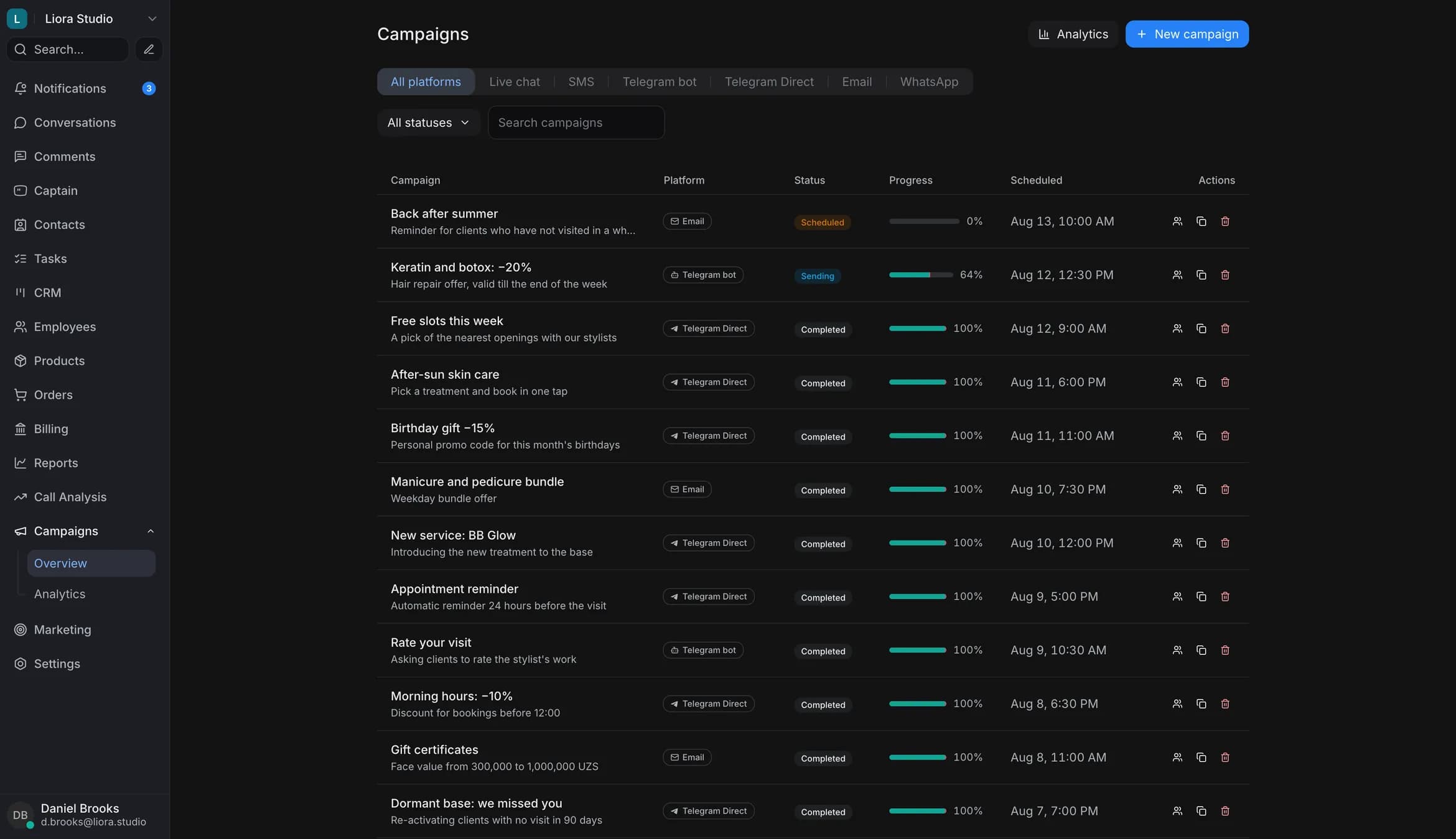
Zukko.AI broadcasts are proactive outbound campaigns from the CRM across all of a customer’s channels at once: web chat, SMS, Telegram, Email and WhatsApp. Sends run on a schedule to precise CRM segments, and delivery, reads and replies are visible in real time.
Four steps from segment to launch — no developers, no exports. You set it up and launch it yourself, right in the CRM.
Pick the audience by tag, funnel stage and history — a precise group of customers, with no manual lists or exports.
Copy, attachments and a template for the channel. Save it as a preset and reuse it in the next campaigns.
Web chat, SMS, Telegram, Email or WhatsApp — all at once or one by one. Launch now, on a schedule (Tashkent timezone) or on an event: a deal stage change, a date, a customer action.
Delivery, reads and replies are visible in real time. A follow-up runs on those who replied, straight from the CRM.
One campaign — every customer channel, a precise audience and transparent delivery.
Web chat, SMS, Telegram, Telegram Direct, Email and WhatsApp — pick channels and filter by platform. The message lands where the customer will read it.
Sending on a schedule at the right hour (Tashkent timezone) or on an event, to a precise audience from the CRM. Segment by tag, funnel stage and history — no manual lists.
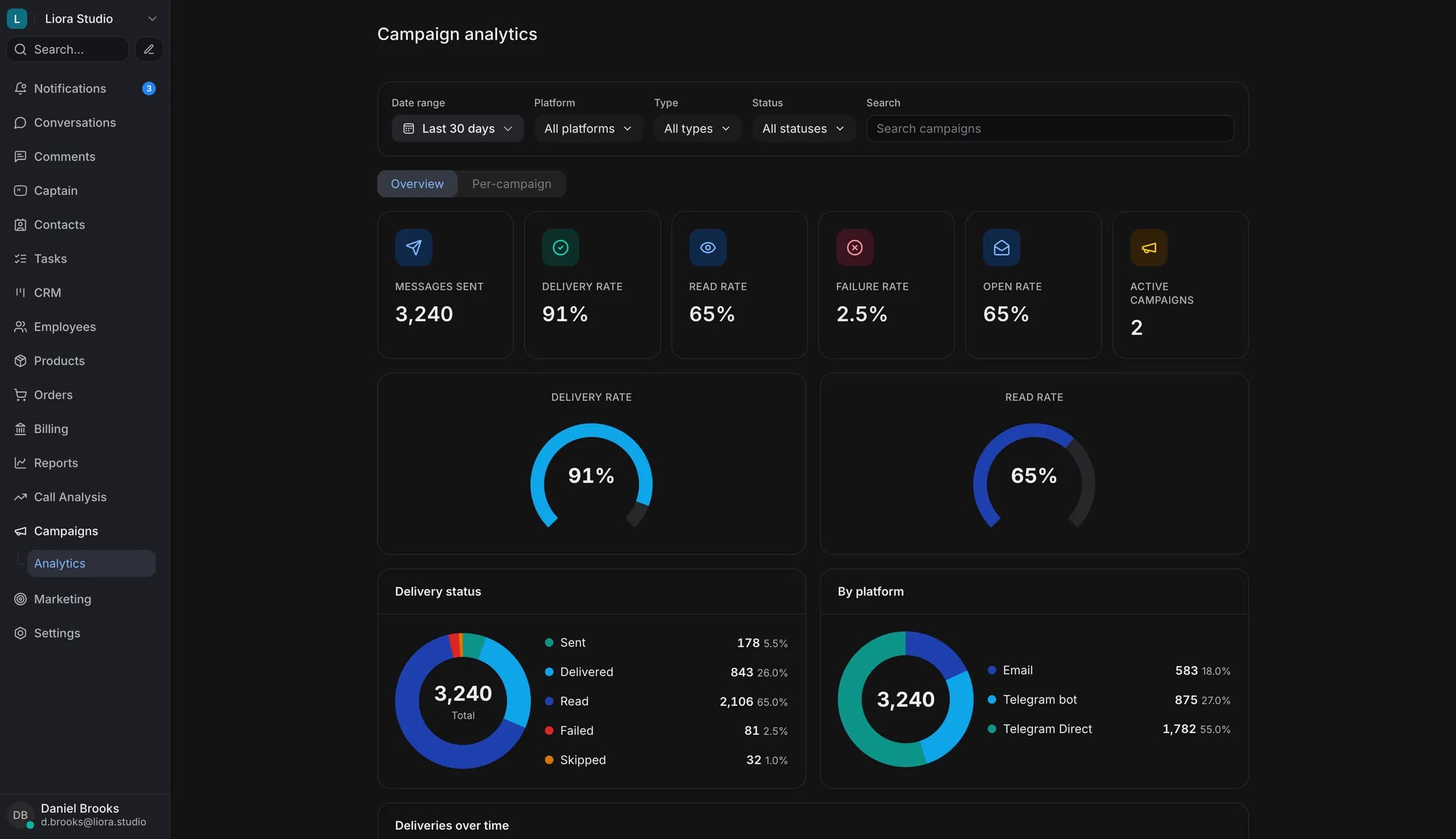
Segments from the CRMFor every campaign you see sent, delivered, read, replied. Delivery, read and failure rates — in real time.
Web chat, SMS, Telegram, Telegram Direct, Email and WhatsApp — an “All platforms” filter and a tab per channel. One campaign works across them all.
Six mechanics that turn a broadcast into a managed process.
A new campaign in a few steps: channel, audience, message, schedule. Enabled and Disabled statuses — the campaign is run from the CRM.
The audience is built from the CRM by tag, segment and funnel stage — no exports or manual lists. Anyone who unsubscribes is excluded from later sends by the system itself.
Deferred sending to a chosen date and hour, Tashkent timezone, or a launch on an event. Ready-made scenarios: “N days after purchase”, “abandoned cart”, “no purchase for N days”. Sending progress shows in an Ongoing status.
A successful campaign is duplicated in one click — change the audience or copy and launch again, no rebuilding from scratch.
Enabled, disabled, scheduled, sending — every campaign’s status is visible at a glance. Progress in real time.
Search across campaigns and filter by status and platform. The right broadcast is found instantly, even in a long list.
Proactive messages that bring customers back and remove the grind.
Bring back those who haven’t written in a while: a segment by CRM history and a message in the right channel.
A reminder about payment, a visit or a renewal — scheduled, in the channel the customer reads.
Announce a promotion, a new product or an event — targeted to the right segment, not everyone.
Collect feedback and rate quality after a purchase or a request.
A reminder about an unfinished order — with the cart details from the CRM.
Channels, CRM segments and payment acceptance for promotions — in one loop.
Leave a number — the demo call runs in Uzbek or Russian.
It takes 2 minutes — nothing to connect or set up.
Updated: September 2026
Web chat, SMS, Telegram, Telegram Direct, Email and WhatsApp. You can send to “All platforms” at once or pick a single channel. Voice broadcasts live in the separate Voice AI module.
Campaigns are in every plan, and sending is paid from your balance. The pricing page shows what a plan includes and what you can add.
Broadcasts are text outbound messages across the customer’s channels: web chat, SMS, Telegram, Email, WhatsApp. Voice calling, where the AI dials and speaks, is the separate Voice AI module.
The audience is built from the CRM by tag, segment and funnel stage — no manual lists or exports. The targeted broadcast goes only to the right group of customers.
Yes. A campaign is scheduled for the right date and hour (Tashkent timezone), sending runs on schedule and progress is visible in the status. A broadcast can also be triggered by an event: a deal stage change, a date, a customer action. A successful campaign can be duplicated and launched again.
Per campaign: sent, delivered, read, replied, the failure rate and volume by hour. In the overview — delivery, read and open rates across all broadcasts, with filters by date, platform, type and status.
Yes. A successful campaign is duplicated in one click: change the audience or copy and launch again, with no rebuilding from scratch.
Broadcasts are designed for customers who already talk to you on these channels, and they follow each channel’s rules. Unsubscribing is built in: the recipient opts out with a button or a command, and the system excludes them from later sends on its own. This helps you meet the requirements; it is not a legal guarantee.
Scheduled sending runs in the Tashkent timezone (UTC+5). In analytics, send volume by hour is shown in UTC.
We’ll show campaigns on your own scenario in 30 minutes. No contracts to sign at this stage.
Onboarding from 2 hours · self-service · CIS banks and large enterprise.

