Every channel
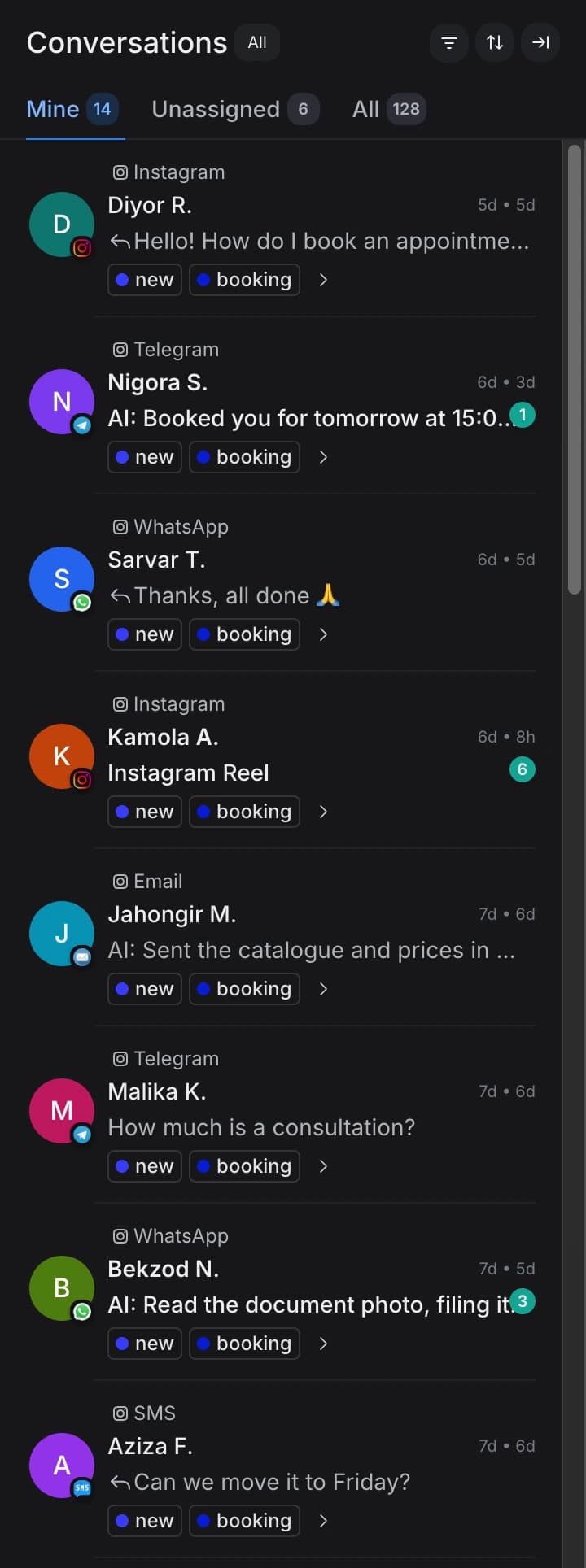
DMs, comments, replies to stories, Telegram, WhatsApp — one thread with shared memory. Asked the price on Instagram, carried on in WhatsApp — the AI remembers the basket and where you left off.
You already paid for this lead — in ads or to a blogger. The AI replies in Instagram DMs, in the comments under your posts and in Telegram within 4 seconds — in Uzbek and Russian, by text and by voice note. It takes the phone number, confirms the item and opens the record in your CRM itself. Calls land in the same record too: every conversation with that customer recorded, transcribed and reviewed by the AI. In the morning you open a funnel, not thirty unread messages: who asked the price, who is ready to order, who already paid.
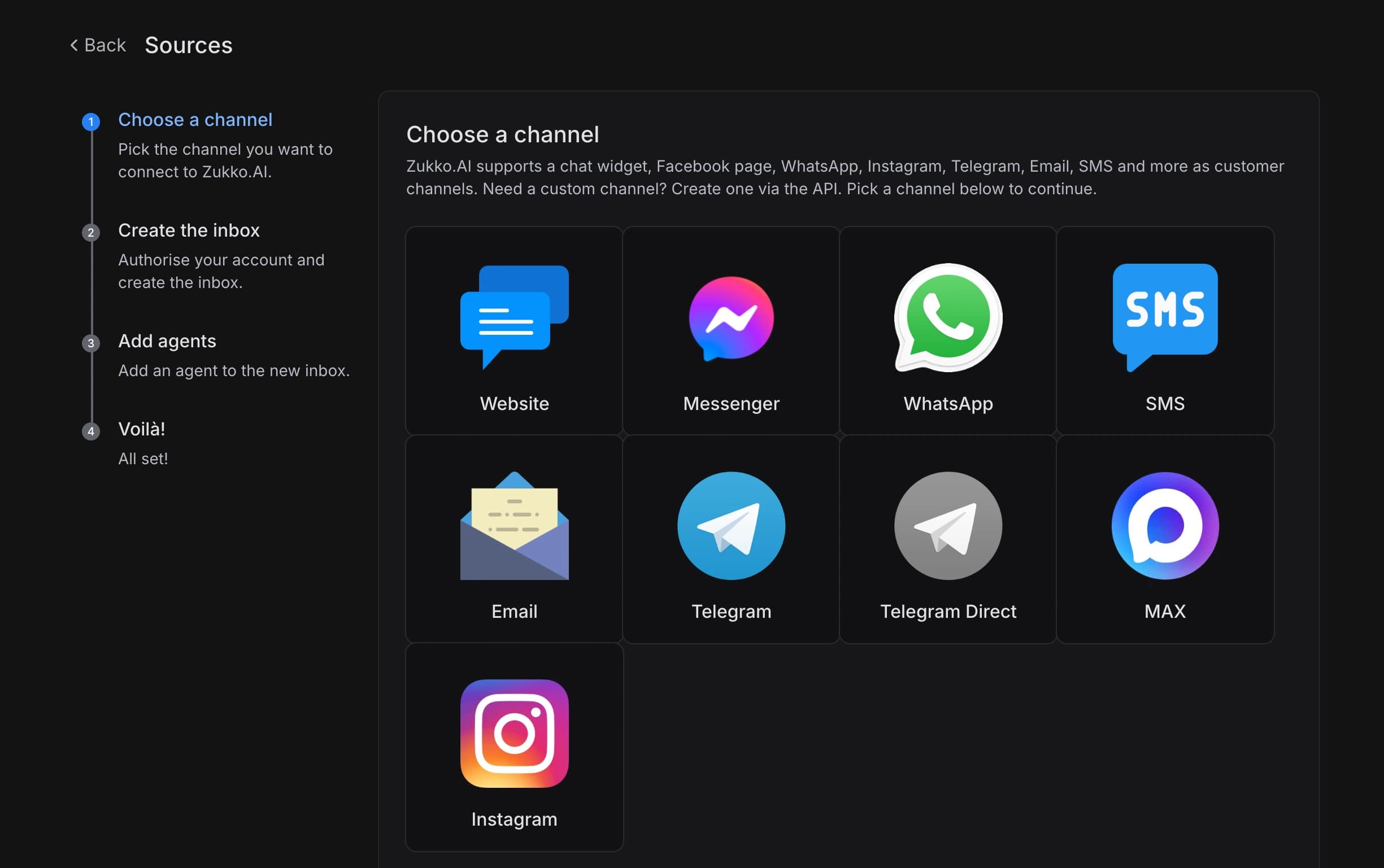
No developer, no contractor: connect Instagram and Telegram over OAuth, upload your price list and launch the AI employee. Small and mid-size business — from 2 hours; large enterprise with integrations — up to 30 days.
Instagram, Telegram, web chat and more — in a couple of minutes over OAuth; WhatsApp — by QR code from the WhatsApp Business app, and the number keeps working in the app. A custom channel connects through the API, from the Business plan.
Prices, stock, delivery terms and answer rules. The AI answers strictly from your material, with no made-up facts.
It replies in 4 seconds in Uzbek, Russian and English, takes the number and opens the CRM record itself.
A manager steps in only where needed — with the conversation history and a one-line summary.
One customer, one conversation — wherever and however they write.
DMs, comments, replies to stories, Telegram, WhatsApp — one thread with shared memory. Asked the price on Instagram, carried on in WhatsApp — the AI remembers the basket and where you left off.
Uzbek, Russian, English — within one conversation. The AI detects the customer’s language from the first message and replies in it, switching as the dialogue moves.
Text, voice notes, photos. The AI transcribes Uzbek speech and reads photos — an order screenshot, a payment receipt, a waybill.
Instagram and Telegram first, then WhatsApp, Messenger, web chat, Email, SMS, MAX, YouTube, TikTok. Each in the same conversation thread, with shared memory and one AI. Need a custom channel? Connect it via API, from the Business plan.
Six mechanics that turn the evening pile of unread messages into a managed funnel.
Each conversation reaches the right agent by topic, language, customer segment and hour. A wholesale order goes to a senior manager; “how much is it?” goes to the AI.
The AI turns Uzbek, Russian and English voice notes into text — it recognises local speech and dialects accurately. Nobody listens to recordings between orders.
The AI reads a photo — an order screenshot, a payment receipt, a waybill, a passport. It extracts the data and fills the record with no manual entry.
Customer tone — neutral, interested, irritated or at risk of leaving — is detected on every message. Irritation flags a manager in real time.
Item, lead source, funnel stage, basket total — tags are applied automatically by your CRM rules. No manual labelling after the shift.
Handover to a manager — with full context: conversation history, a one-line summary, the suggested next step, open items in the cart.
The controls that mean a shop no longer needs a dedicated person on chat.
Someone asks the price under a post — the AI replies in the comment and DMs the author with details. Comments stop sinking.
An Instagram chatbot or an AI agentWorking hours per channel, Tashkent timezone. Off-hours, an auto-message and pre-chat form mean no request is lost.
After each conversation the customer rates it — you see how the AI and every manager reply.
Attach your catalogue and Help Center — the AI answers strictly from your material, no made-up facts.
An auto-greeting on the first message — the customer sees they’ve been heard.
Multiple managers on one inbox, conversation handoff, shared notes.
The same ad budget and the same team — but no lead burns out.
| Stage | Before Zukko | With Zukko |
|---|---|---|
| Answering “how much is it?” | In the morning — after they bought elsewhere | 4 seconds, at any hour |
| Comments under posts | They sink; half go unanswered | The AI replies and DMs the author |
| Uzbek voice notes | A manager listens between orders | The AI turns them into text in seconds |
| Order photos and screenshots | A manager keys in data by hand | The AI reads it and fills the record |
| CRM data entry | In the evening, from the chat and from memory | In real time, automatically |
| Nights and weekends | Requests wait until morning | Answered around the clock — no surcharges |
| Peak season | Hiring people for a month | The AI holds the flow without hiring |
Answers in seconds, every channel in one window, a CRM filled in without you.
Leave a number — the demo call runs in Uzbek or Russian.
It takes 2 minutes — nothing to connect or set up.
Updated: October 2026
Zukko.AI is a CRM with an AI agent for Instagram and Telegram, and Inbox AI connects: Instagram (DMs, comments under posts and Reels, replies to stories), Telegram, WhatsApp, Facebook Messenger, web chat, Email, SMS, MAX, YouTube, TikTok — all in one conversation thread with shared memory. Need a custom channel? We connect it via API, from the Business plan. Your managers’ calls land in the same customer record with the recording, transcript and AI analysis, while voice conversations are run by the separate Voice AI module.
Yes. The AI detects the customer’s language from the first message and replies in Uzbek, Russian or English, switching as the dialogue moves. It turns Uzbek voice notes into text accurately — including local speech and dialects. This is exactly what global platforms do not do: the Uzbek voice is our own technology.
A builder pushes the customer through buttons and lives in one channel — which is exactly why people get annoyed by it. Inbox AI understands free text, voice notes and photos, remembers the customer across every channel, carries them through to a number and an order, and writes the data into the CRM record. Anything complex goes to a manager, not to “sorry, I didn’t understand that”.
The AI hands the conversation to a manager with full context: the message history, a one-line summary, the suggested next step and open items in the cart. Irritation or churn risk is flagged in real time. The dialogue itself does not stall: the AI captures the phone number and passes it to the next step of the cycle — a booking or a call. The AI places voice calls itself only with AI calls on the Enterprise plan; on other plans the number goes to a manager.
No. Attach your price list, catalogue or Help Center and the AI answers strictly from your material. If there is no answer, the conversation goes to a manager rather than being invented. Item, lead source and funnel stage are tagged automatically by your CRM rules.
For small and mid-size business — from 2 hours, self-service: connect the channels, upload the price list, launch the AI employee yourself. No integrator or contractor needed. For large enterprise with integrations — up to 30 days.
Yes. Inbox AI is a module of the single Zukko.AI platform: conversations, tags, the customer’s number and data from document photos land in the CRM record in real time. No copying orders from chats into a spreadsheet in the evening — the funnel from ad click to payment builds itself.
Start — 699,000 UZS per month, Business — 3,900,000, Enterprise — from 10,900,000. Call reviews are capped at 300 a month on Start, with no such limit from the Business plan. AI calls are available only on the Enterprise plan, from 15,000,000 UZS/mo for the whole product. For small and mid-size business, launch is from 2 hours, self-service.
We’ll take your real Instagram and Telegram and show how the AI replies, takes the number and opens the record in the CRM. No commitments at this stage.
Onboarding from 2 hours · launch without an integrator · Uzbekistan Airways among our clients.


